Spring学习日记04:JDBC Template
概念
JDBC
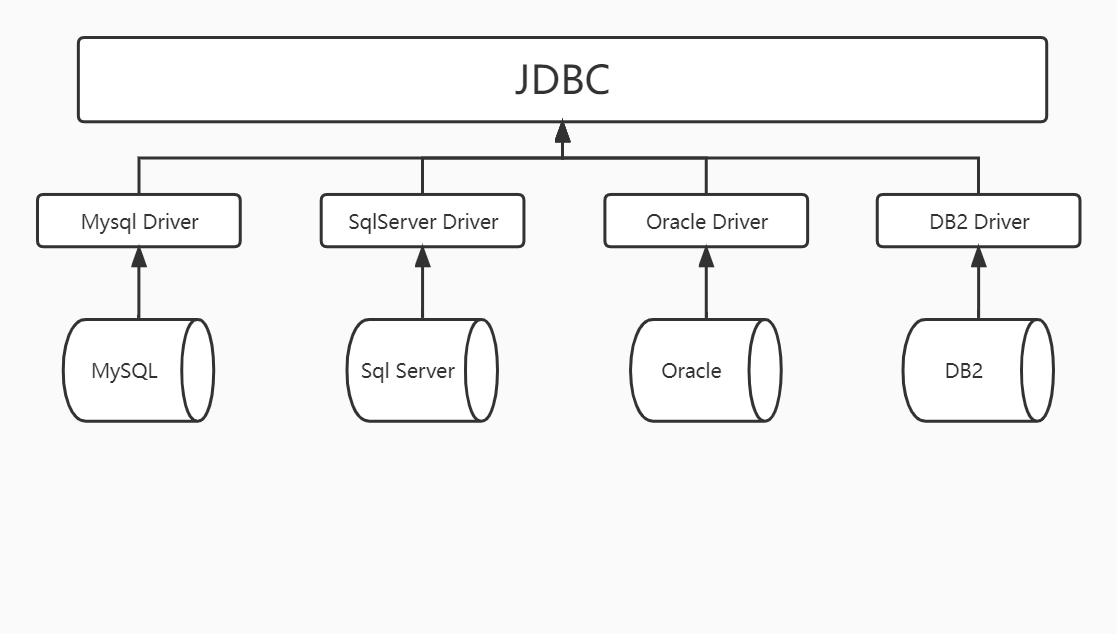
JDBC(Java DataBase Connectivity,java数据库连接)是一种用于执行SQL语句的Java API,可以为多种关系数据库提供统一访问,它由一组用Java语言编写的类和接口组成。
因为市面上有多种数据库,数据库编写的语言又不一样,所以连接各个数据库的驱动编写的语言也不一样,这时要使用相关的数据库,则必须学习相关数据库的驱动,就会造成开发人员学习和使用成本。sun公司为了规范统一,则定义了JDBC这套接口,所有厂商的数据库驱动只要遵循这套规范,则可以对数据库操作。开发人员就不必再学习相关的数据库驱动,只需要学习这套规范,使用JDBC操作数据库即可。也就是说在关系型数据库原理中 JDBC使得各种数据库实现了同样的接口,但是在这之下的Driver每个实现原理各有不同。如图所示:
ORM框架
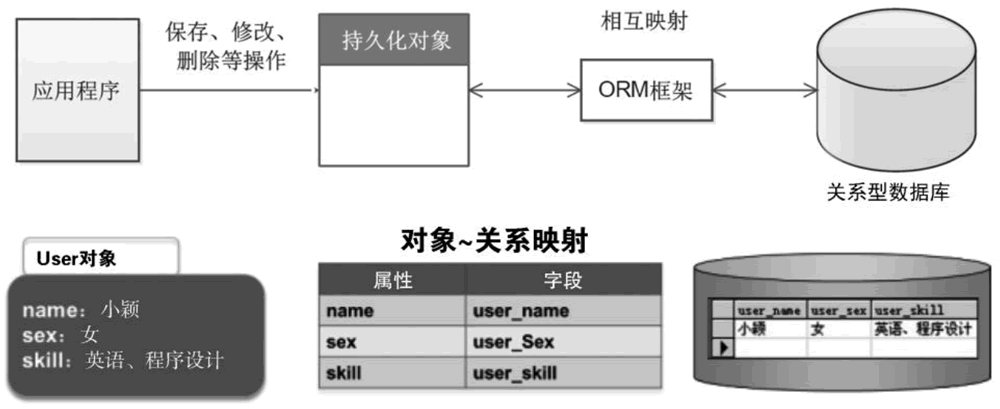
在这之上,是ORM框架(Object Relational Mapping)。 ORM 框架就是一种为了解决面向对象与关系型数据库中数据类型不匹配的技术,它通过描述 Java 对象与数据库表之间的映射关系,自动将 Java 应用程序中的对象持久化到关系型数据库的表中。ORM 框架是一种数据持久化技术,即在对象模型和关系型数据库之间建立起对应关系,并且提供一种机制,可通过 JavaBean对象操作数据库表中的数据,如图所示。
Mybatis、Hibernate就是常见的 Java ORM框架。
MyBatis 框架通过简单的 XML 或注解进行配置和原始映射,将实体类和 SQL 语句之间建立起映射关系,是一种半自动化的 ORM 实现。
Hibernate 框架是一个全表映射的框架。通常开发者只要定义好持久化对象到数据库表的映射关系,就可以通过 Hibernate 框架提供的方法完成持久层操作。开发者并不需要熟练地掌握 SQL 语句的编写,Hibernate 框架会根据编制的存储逻辑,自动生成对应的 SQL,并调用 JDBC 接口来执行,所以其开发效率会高于 MyBatis 框架。
JDBC Template
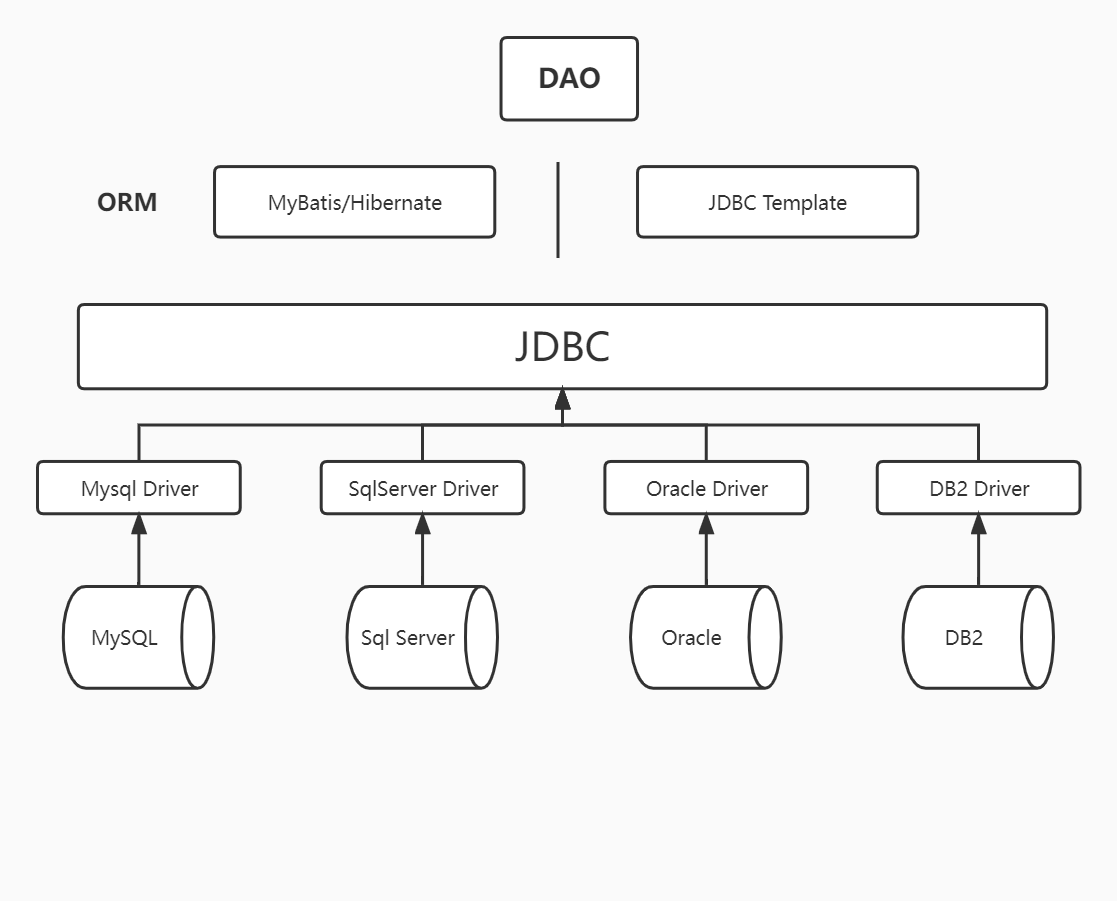
与Mybatis、Hibernate这些ORM不同,JDBC Template是Spring所使用的数据库持久化层,与ORM相比显得更加轻量级一些(Spring 自带)。
有关持久层整体概念图如下:
代码:原生jdbc
public class App {
    public static void main(String[] args) {
        // 1.原生的jdbc
        // 配置
        DriverManagerDataSource ds = new DriverManagerDataSource();
        ds.setDriverClassName("com.mysql.cj.jdbc.Driver");
        ds.setUrl("jdbc:mysql:///db2?serverTimezone=UTC&allowMultiQueries=true");
        ds.setUsername("root");
        ds.setPassword("123456");
        JdbcTemplate jt = new JdbcTemplate();
        jt.setDataSource(ds);
        jt.execute("INSERT INTO USER (USERNAME,BIRTHDAY,GENDER,ADDRESS)" +
                "VALUES" +
                "('AAAA','2021-12-29','男','xxxxx')"
        );
    }
}
代码:Spring IoC 控制的 Jdbc Template
xml配置文件:
<?xml version="1.0" encoding="UTF-8"?>
<beans xmlns="http://www.springframework.org/schema/beans"
xmlns:xsi="http://www.w3.org/2001/XMLSchema-instance"
xsi:schemaLocation="http://www.springframework.org/schema/beans
http://www.springframework.org/schema/beans/spring-beans.xsd">
<bean id="ds" class=" org.springframework.jdbc.datasource.DriverManagerDataSource">
<property name="driverClassName" value="com.mysql.cj.jdbc.Driver"></property>
<property name="url" value="jdbc:mysql:///db2?serverTimezone=UTC&allowMultiQueries=true"></property>
<property name="username" value="root"></property>
<property name="password" value="123456"></property>
</bean>
<bean id="jt" class="org.springframework.jdbc.core.JdbcTemplate">
<property name="dataSource" ref="ds"></property>
</bean>
</beans>
APP:
public class App {
    public static void main(String[] args) {
        // Spring IoC控制的 JDBCTemplate
         ApplicationContext ac = new ClassPathXmlApplicationContext();
         JdbcTemplate jt = (JdbcTemplate) ac.getBean("jt");
         jt.execute("INSERT INTO USER(USERNAME,BIRTHDAY,GENDER,ADDRESS)" +
                 "VALUES" +
                 "('bbbbb','2022-01-01','女','xxxxx')");
    }
}
增删改:update
// 增加
jt.update("INSERT INTO USER(USERNAME,BIRTHDAY,GENDER,ADDRESS)" +
        "VALUES" +
        "(?,?,?,?)","silvercorridors","2022-01-02","男","xxxxxx");
// 删除
jt.update("DELETE FROM USER WHERE ID = ?",10);

// 修改
jt.update("UPDATE USER SET USERNAME = ? WHERE ID = ?","cccc",11);
查询
自定义映射结果集
public static void main(String[] args) {
        // 3.2 查询
        class UserRowMapper implements RowMapper<User>{
            @Override
            public User mapRow(ResultSet resultSet, int i) throws SQLException {
                User user = new User();
                user.setId(resultSet.getInt("ID"));
                user.setUsername(resultSet.getString("USERNAME"));
                user.setGender(resultSet.getString("GENDER"));
                user.setBirthday(resultSet.getString("BIRTHDAY"));
                user.setAddress(resultSet.getString("ADDRESS"));
                return user;
            }
        }
        List<User> users = jt.query("SELECT * FROM USER WHERE USERNAME = ?",new UserRowMapper(),"aaaa");
        for (User user : users) {
            System.out.println(user);
        }
}
使用JdbcTemplate自带映射
public static void main(String[] args) {
    // 查询返回自定义类
    List<User> users = jt.query("SELECT * FROM USER WHERE USERNAME = ?",new 		BeanPropertyRowMapper<User>(User.class),"aaaa");
        for (User user : users) {
            System.out.println(user);
        }
    // 查询返回整数
        Long count = jt.queryForObject("SELECT COUNT(*) FROM USER", Long.class);
        System.out.println(count);

}
事务
AccountService类
public class AccountService {
    private JdbcTemplate jt;
    public JdbcTemplate getJt() {
        return jt;
    }
    public void setJt(JdbcTemplate jt) {
        this.jt = jt;
    }
    public void transfer(Integer id1, Integer id2, Integer balance) {
        jt.update("UPDATE ACCOUNT SET BALANCE = BALANCE - ? WHERE ID = ?",
                balance, id1);
        int i = 5 / 0;
        jt.update("UPDATE ACCOUNT SET BALANCE = BALANCE + ? WHERE ID = ?",
                balance, id2);
    }
}
运行
AccountService accountService = ac.getBean("accountService", AccountService.class);
accountService.transfer(1,3,300);
AOP实现事务
xml配置文件方式
application.xml
<?xml version="1.0" encoding="UTF-8"?>
<beans xmlns="http://www.springframework.org/schema/beans"
xmlns:xsi="http://www.w3.org/2001/XMLSchema-instance"
xmlns:aop="http://www.springframework.org/schema/aop"
xmlns:tx="http://www.springframework.org/schema/tx"
xsi:schemaLocation="
http://www.springframework.org/schema/beans
http://www.springframework.org/schema/beans/spring-beans.xsd
http://www.springframework.org/schema/tx
http://www.springframework.org/schema/tx/spring-tx.xsd
http://www.springframework.org/schema/aop
http://www.springframework.org/schema/aop/spring-aop.xsd
">
<bean id="ds" class=" org.springframework.jdbc.datasource.DriverManagerDataSource">
<property name="driverClassName" value="com.mysql.cj.jdbc.Driver"></property>
<property name="url" value="jdbc:mysql:///db2?serverTimezone=UTC&allowMultiQueries=true"></property>
<property name="username" value="root"></property>
<property name="password" value="123456"></property>
</bean>
<bean id="jt" class="org.springframework.jdbc.core.JdbcTemplate">
<property name="dataSource" ref="ds"></property>
</bean>
<bean id="transactionManager" class="org.springframework.jdbc.datasource.DataSourceTransactionManager">
<property name="dataSource" ref="ds"></property>
</bean>
<bean id="accountService" class="cn.silvercorridors.AccountService">
<property name="jt" ref="jt"></property>
</bean>
<!--AOP-->
<tx:advice id="txAdvice" transaction-manager="transactionManager">
<!-- 可以配置的属性:isolation 事务的隔离级别,DEFAULT,使用数据库的隔离级别
propagation 事务的传递行为:REQUIRED(缺省),如果没有事务新建一个,如果有使用现有的
SUPPORTS 如果没有事务,按照非事务处理,如果有,使用现有的。
read-only: 事务是否只读:增删改false 查询true
timeout: 以秒为单位,默认是-1,不超时
rollback-for:设定回滚的异常的类型,比如X,X发生时回滚,不是X时不回滚。缺省:没有,此时任何异常都回滚。
no-rollback-for:指定不回滚的异常的类型,比如Y,Y发生时不回滚。缺省:没有,此时任何异常都回滚。
-->
<tx:attributes>
<tx:method name="update*" propagation="REQUIRED" read-only="false"/>
<tx:method name="query*" propagation="SUPPORTS" read-only="true"/>
</tx:attributes>
</tx:advice>
<aop:config>
<aop:pointcut id="pointCut1" expression="execution(* cn.silvercorridors.*.*(..)))"/>
<aop:advisor advice-ref="txAdvice" pointcut-ref="pointCut1"></aop:advisor>
</aop:config>
</beans>
ApplicationContext ac = new ClassPathXmlApplicationContext("application.xml");
JdbcTemplate jt = (JdbcTemplate) ac.getBean("jt");
AccountService accountService = ac.getBean("accountService", AccountService.class);
accountService.updateTransfer(1,3,300);
注解方式
SpringConfiguration.java
@Configuration
@ComponentScan(basePackages = "cn.silvercorridors")
@EnableTransactionManagement
public class SpringConfiguration {
    @Bean(name = "ds")
    public DataSource createDataSource() {
        DriverManagerDataSource ds = new DriverManagerDataSource();
        ds.setDriverClassName("com.mysql.cj.jdbc.Driver");
        ds.setUrl("jdbc:mysql:///db2?serverTimezone=UTC&allowMultiQueries=true");
        ds.setUsername("root");
        ds.setPassword("123456");
        return ds;
    }
    @Bean(name = "jt")
    public JdbcTemplate createJdbcTemplate(DataSource ds) {
        JdbcTemplate jt = new JdbcTemplate();
        jt.setDataSource(ds);
        return jt;
    }
    @Bean(name = "transactionManager")
    public PlatformTransactionManager createTransactionManager(DataSource ds) {
        DataSourceTransactionManager transactionManager = new DataSourceTransactionManager();
        transactionManager.setDataSource(ds);
        return transactionManager;
    }
}
APP.java
ApplicationContext ac = new AnnotationConfigApplicationContext(SpringConfiguration.class);
AccountService accountService = ac.getBean("accountService", AccountService.class);
accountService.updateTransfer(1,3,300);
AccountService.java
@Repository
@Transactional(propagation = Propagation.SUPPORTS,readOnly = true)
public class AccountService {
    @Autowired
    private JdbcTemplate jt;
    public JdbcTemplate getJt() {
        return jt;
    }
    public void setJt(JdbcTemplate jt) {
        this.jt = jt;
    }
    @Transactional(propagation = Propagation.REQUIRED,readOnly = false)
    public void updateTransfer(Integer id1, Integer id2, Integer balance) {
        jt.update("UPDATE ACCOUNT SET BALANCE = BALANCE - ? WHERE ID = ?",
                balance, id1);
        int i = 5 / 0;
        jt.update("UPDATE ACCOUNT SET BALANCE = BALANCE + ? WHERE ID = ?",
                balance, id2);
    }
}
TransactionManager具体如何工作
经过以上配置,事实上,相当于Spring做了如下工作
DriverManagerDataSource ds = new DriverManagerDataSource();//数据库连接配置
ds.setDriverClassName(...);
ds.setUrl(...);
ds.setUsername(...);
ds.setPassword(...);

JdbcTemplate jt = new JdbcTemplate();// jdbcTemplate
transactionManager.setDataSource(ds); // 设置数据库

TransactionTemplate tt = new TransactionTempalte();
tt.setTransactionManager(transactionManager);
tt.execute(new TransactionCallback<Object>{
    @Override Object doIntransaction(TransactionStatus transactionStatus){//真正干活的内容
        AccountService = new AccountService();
        accountService.setJt(jt);
        accountService.updateTransfer(1,3,300);
        return null;
    }
});